Early access · Android first

A room for what you read.

Brainshelves is for the moment after a chapter, an article or a video, when something stood out and is about to be forgotten.

Say out loud what stood out. Brainshelves turns it into a short list of ideas, you keep only what is true, and the ideas come back to you later.

4

kinds of source: books, articles, Substack, YouTube

5

kinds of idea it listens for

3

questions to go deeper on each

Books, articles and videos share one shelf.

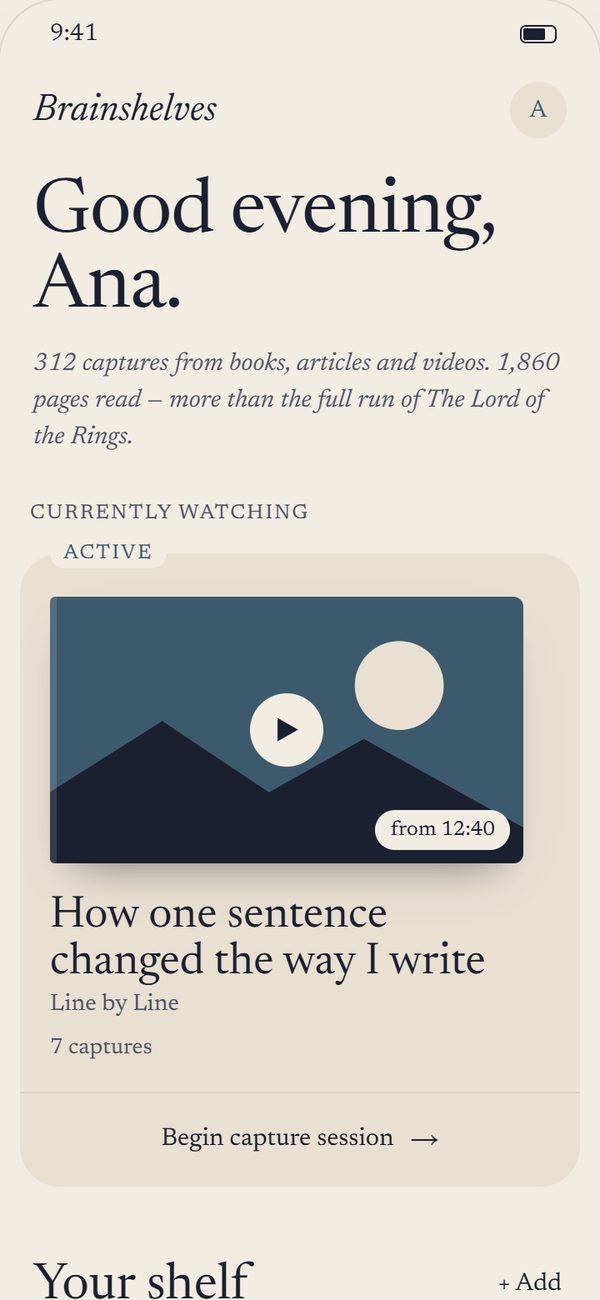
The Brainshelves library: a video being watched, then a shelf of books, a Substack post and an article.

How it works

From the last page to an idea you put to use.

Six steps, in the order you meet them. The first four take a few minutes after you read or watch. The last two happen over the weeks that follow.

i.

Add what you read or watched

A book, found by title, author or ISBN, scanned from its barcode, or added by hand. Or a link shared from your browser, the Substack app or YouTube. For a link, only its public details are kept: title, author, site and picture.
Thinking in Systems
Donella H. Meadows
Book
The Long Way Home
Maya Okafor
Substack
Why we forget what we read
Hollis Review
Article
The case for doing nothing, slowly
Fallow · from 12:40
YouTube
ii.

Say what stood out

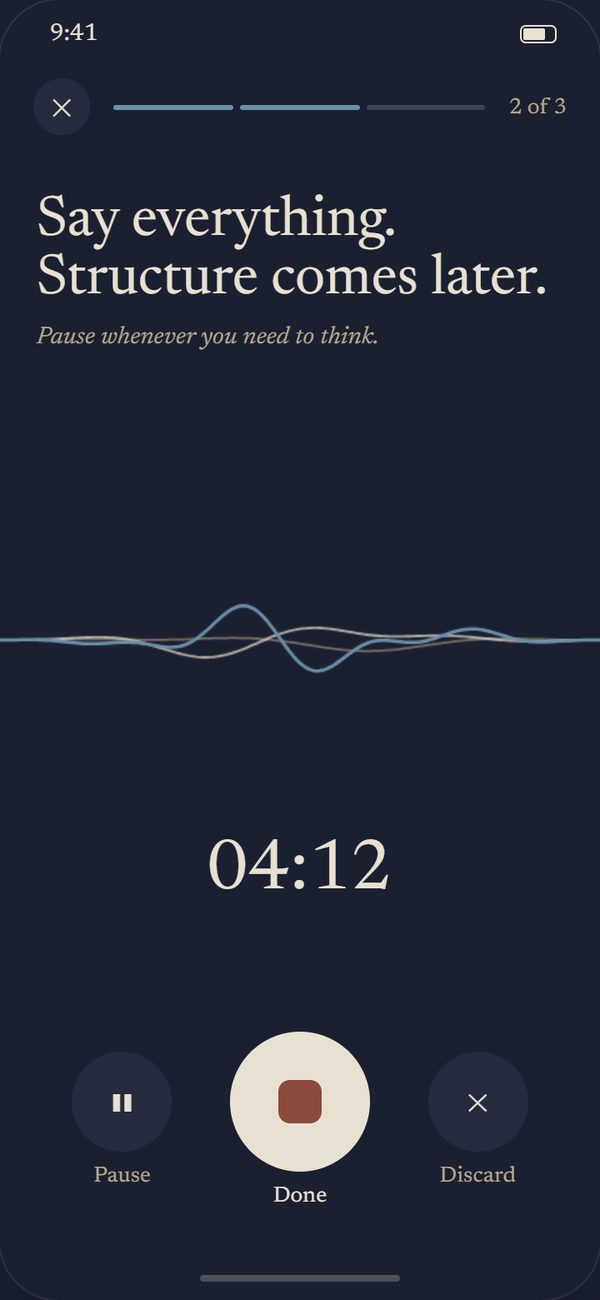
Open it when you put the book down, and talk. There is no script and no clock to beat: pause whenever you need to think. Before your first recording, the app explains where the audio goes and asks for your agreement.

The recording screen: Say everything. Structure comes later. A timer reads 04:12.
iii.

Keep what is true

Brainshelves turns what you said into a short list of ideas: realizations, concepts, frameworks, quotes and things to do. Keep, edit or discard each one. Nothing reaches your library until you confirm, and you can report a suggestion that is wrong.

Realizationp. 14

I keep trying to fix the flow when the problem is the stock. My inbox isn't a speed problem. Nothing ever leaves it.

RealizationConceptFrameworkQuoteAction item
iv.

Put it to use

Where an idea can be used, you say when you would use it and what you would do. Speak it or type it. A framework you can name the moment for is one you are more likely to reach for.

Frameworkp. 19

Before speeding up what comes in, check whether what goes out is quietly blocked.

Whenthe team keeps missing the same deadline Thenmap where work leaves the system before adding anyone new
v.

It comes back

An old note returns when you open the app, or as a reminder at a time of day you choose. You set how often. The ideas you kept get a second chance to change something.

From your archive

A note you left four days ago.

Quotep. 145

The time is going to pass anyway. The question is what you leave in it.

Four Thousand Weeks · Oliver Burkeman

vi.

Go deeper in the journal

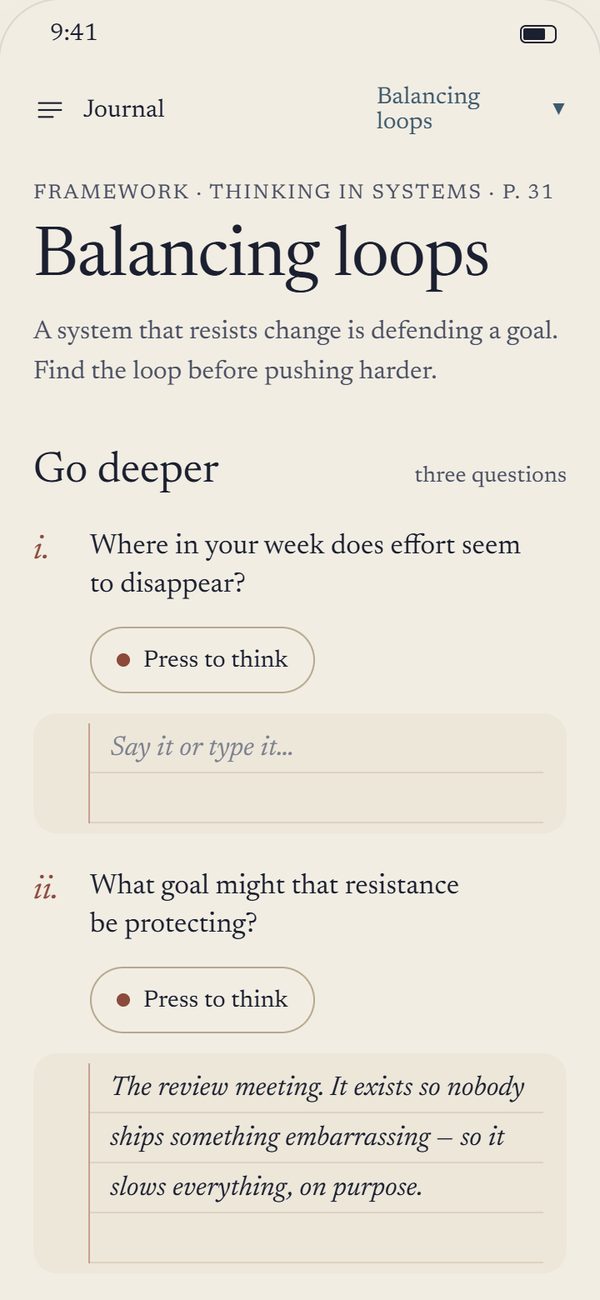
Take a note into the journal. Three questions help you think it through, then dated pages hold small experiments of your own. Answer by voice or by hand, and ask for a suggested experiment when you are stuck.

The journal: a concept called Balancing loops with three numbered questions and ruled writing wells.

Why we're building it

Reading feels like progress. A month later, little of it is left.

You finish a book, close a long article, reach the end of a video, and something in it mattered. By the next week you could not say what. Highlights pile up where nobody reads them, and notes taken mid-chapter interrupt the reading they were meant to serve.

Brainshelves starts from a simpler habit. Put the thing down and say what stood out, the way you would tell a friend. Talking is quicker than writing and closer to what you actually thought. The app does the sorting, you do the deciding, and the ideas come back later so they have a chance to change something.

It began as a web app one person built for their own reading. It is being rebuilt for Android so that other people can use it. It is deliberately not a notes app or a productivity system: once the ideas are kept, the book can go back on the shelf.

What we chose, and what it costs

Voice first

You talk instead of typing notes while you read.

Cost: it needs a quiet minute and a connection. You can always write a note by hand instead.

You decide what is kept

The AI suggests. Nothing is saved until you confirm it, and a bad suggestion can be reported.

Cost: a short review after every recording.

An AI service that does not train on you

Recordings go to Groq, which says it does not train its models on what you send. AI services whose free tiers do train on your words were ruled out.

Cost: a smaller choice of AI, and a daily allowance for each person.

Only public details from links

For an article or a video, Brainshelves keeps the title, author, site and picture. It never stores the article or the transcript.

Cost: it cannot summarise a link for you. The ideas have to come from you.

Not yet

iPhone

The app is built from one codebase for both. Android comes first, and iOS follows.

Searching by meaning

The web app can search your notes by what they mean. The phone app does not have that page yet.

Pricing

Free for now. Features, limits and pricing may change.

Platform

Android first · iOS later

App

Expo · React Native

Speech and ideas

Groq · Whisper, GPT-OSS

Library

Supabase · Vercel

Your data

Your voice goes to one AI service, and only after you agree.

Recordings are turned into text and then deleted. Your library is private to your account, and you can take it with you or delete it whenever you like.

About a day

longest a recording is kept

Deleted once it has been turned into text. A daily clean-up removes anything left behind.

30 days

at most, at Groq

Groq may keep what it processed for up to 30 days to check for misuse. We cannot shorten that.

None

ads or sold data

No advertising, no behavioural analytics, and nothing sold or rented to anyone.

Any time

export or delete

Export your library as Markdown, or delete your account and everything in it.

What the app tells you before your first recording

Before you record.

Who handles your data

Five services, each for one job.

Supabase

Your library, sign-in, and short-lived audio storage.

Vercel

Hosts the website and the server the app talks to.

Groq

Speech to text, and the AI that finds your ideas.

Sentry

Short crash reports. Never your journal, transcripts, voice or email.

Google

Sign-in with Google if you choose it, and book search through Google Books.

Early access

Android first. A closed test now, Google Play after.

Before Brainshelves can be published on Google Play, a group of testers has to use it for two weeks. It is new: features, limits and pricing may change, and some things will be rough.

Closed test

Become a tester.

Write to us and we will send you the invitation link. Then:

  1. Open the link, choose Become a tester, and install the app from Google Play.
  2. Stay opted in for at least 14 days. Leaving early can reset the count for everyone.
  3. Use it for real. Add a book or a link, say what stood out, keep what is true, and open the journal once.
  4. Tell us when something goes wrong, with roughly the time and what you were doing.
brainshelves.net@gmail.com

What the app asks for, and when

Microphone

Only while you record.

Camera

Only to scan a book's barcode.

Notifications

Only if you turn on the daily reminder.